
About Brian Porter
During yesterday’s personal Hackathon, I started a project which I might introduce here sometime. But the coolest revelation was (again) how easy it was to get up and running.
- Create a new Play Project
- Add Secure Social and configure it for Twitter, and use the InMemoryUserService from the examples. (all this is described here http://securesocial.ws/guide/getting-started.html and only takes a minute)
- Add the dependecy to twitter4j to your Build.scala like this:
'org.twitter4j'% 'twitter4j-core'% '3.0.3'
- Secure your controller action method to force the (Login) Authentication with Twitter. Remember — because you are using the InMemoryUserService none of the Authentication data is stored — you will have to reconnect each time.
@SecureSocial.SecuredAction - I then added these standard methods to get the Authenticated Twitter User, Token, Secret and the twitter4J Connection: (The tokenSecret, token and current User are coming from the Secure Social Oauth1 Connection, and are used to authenticate the Twitter Connection.
public static Twitter getTwitterInstance() {// The factory instance is re-useable and thread safe.TwitterFactory factory = new TwitterFactory();Twitter twitter = new TwitterFactory().getInstance();twitter.setOAuthConsumer(Play.application().configuration().getString('securesocial.twitter.consumerKey'), Play.application().configuration().getString('securesocial.twitter.consumerSecret'));twitter4j.auth.AccessToken accessToken = new twitter4j.auth.AccessToken(token(), tokenSecret());twitter.setOAuthAccessToken(accessToken);return twitter;}public static String tokenSecret() {String retval = '';scala.collection.Iterator iterator = Application.getCurrentUser().oAuth1Info().iterator();while (iterator.hasNext()) {OAuth1Info oAuth1Info = iterator.next();retval = oAuth1Info.secret();}return retval;}public static String token() {String retval = '';scala.collection.Iterator iterator = Application.getCurrentUser().oAuth1Info().iterator();while (iterator.hasNext()) {OAuth1Info oAuth1Info = iterator.next();retval = oAuth1Info.token();}return retval;}public static Identity getCurrentUser() {return (Identity) ctx().args.get(SecureSocial.USER_KEY);} - Then I added some code in my Controller to list (for example) my Followers
long cursor = -1;IDs ids;System.out.println('Listing following ids.');do {ids = twitter.getFriendsIDs(cursor);for (long id : ids.getIDs()) {twitter4j.User twitterUser = twitter.showUser(id);twitterUsers.put(twitterUser.getScreenName(), new TwitterUser(id,twitterUser));System.out.println(id);}} while ((cursor = ids.getNextCursor()) != 0);
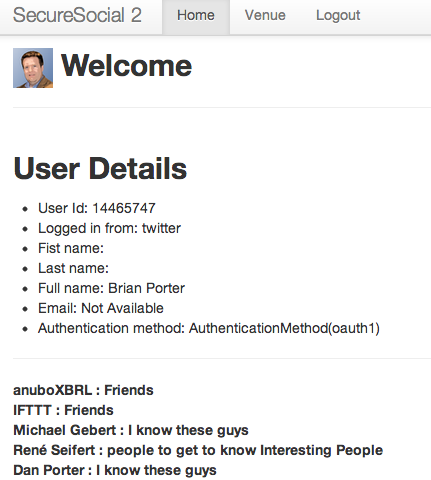
Yes, that is it…
Reference: Using twitter4j with Play! Framework and Secure Social is this easy from our JCG partner Brian Porter at the Poornerd blog.
Source : http://www.javacodegeeks.com/2013/03/using-twitter4j-with-play-framework-and-secure-social-is-this-easy.html


